
Calendar links
Every listing site publishes an export link — a long web address ending in .ics that
carries the dates that are booked. Paste it into Suitiee and each booking on it becomes a
turnover, with no code and no integration to arrange with anyone.
This is the lane that works for any site: Gathern, Qotoon, Vrbo, Agoda, Expedia, Airbnb and Booking.com all publish one.
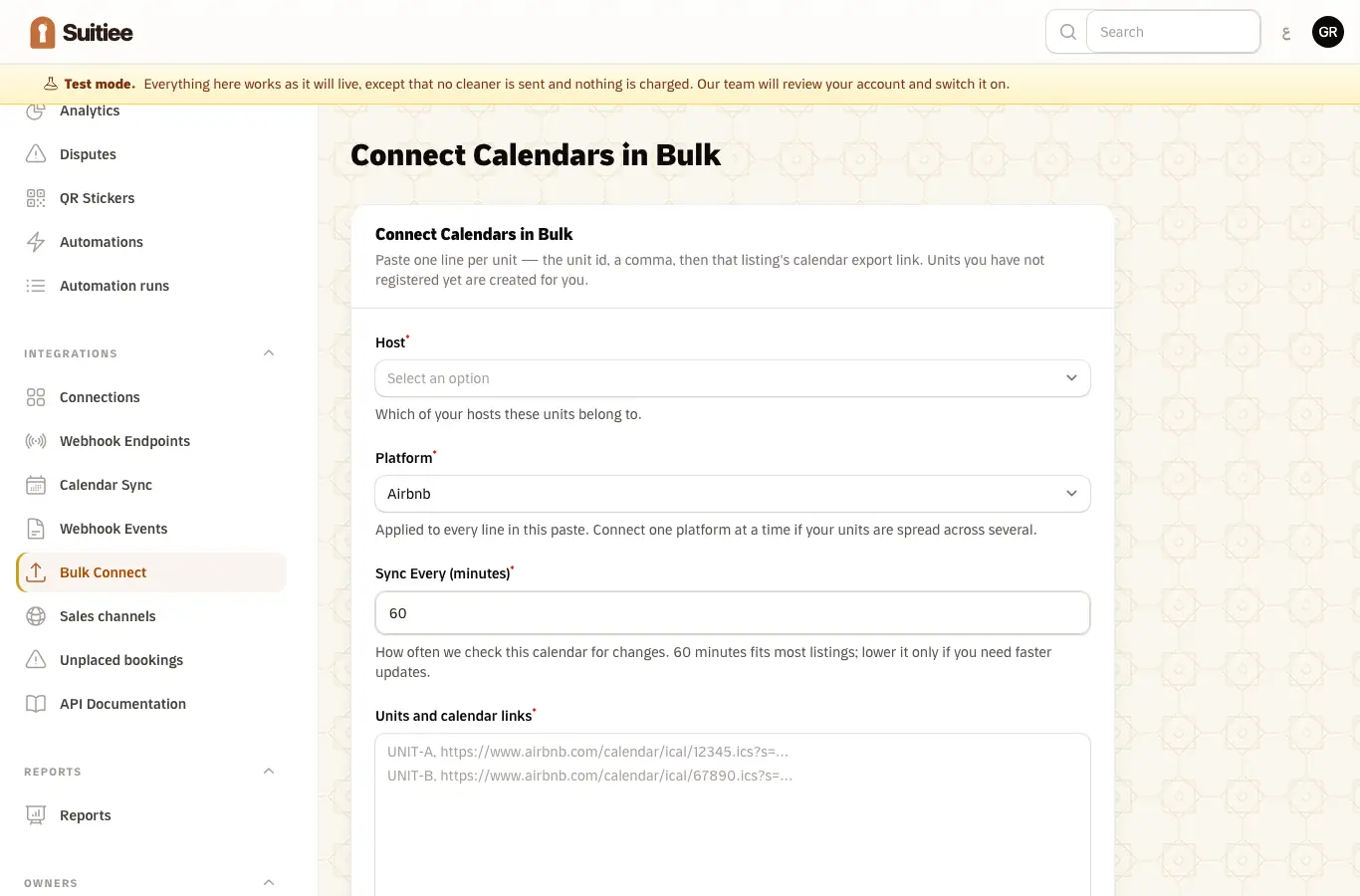
Hosts and operators both find it under Channels — each channel's own page lists its links, and a unit's Channels tab lists the unit's. Operators also have Channels → Calendar Sync, or Bulk Connect Calendars to paste many at once.
What you need
- The export link from each listing (below: where each site hides it).
- Which unit each link belongs to — or let the import create the units from the calendar names.
Step 1 — Find the export link
| Site | Where it is |
|---|---|
| Airbnb | Listing → Availability → Connect calendars → Export calendar |
| Booking.com | Extranet → Rates & Availability → Calendar sync → Export calendar |
| Gathern | Open the unit → Calendar → Sync calendars → copy the export link |
| Agoda | YCS → Property → Calendar sync → Export |
| Expedia | Partner Central → Rates & Availability → Calendar sync → Export |
| Vrbo | Listing → Calendar → Import/Export → Export calendar |
| Anything else, Qotoon included | Look for "export", "sync" or "iCal" in the calendar settings. Any site that publishes an .ics link works — connect it as Other |
These are directions rather than links on purpose: every one of these consoles reorganises itself, and a dead link is worse than none.
The link is long and carries a token, like
https://www.airbnb.com/calendar/ical/12345.ics?s=…. Paste it exactly as given — it is your
calendar's private read-only address, not something to type by hand.
Step 2 — Paste it
- New Calendar Feed.
- Unit — which one this calendar belongs to.
- Platform — which site it came from.
- Calendar (iCal) URL — paste the link. Account (optional) — if you sell on the site from more than one account, name the one this link comes from, for example Gathern — Abu Fahad. The calendar links list can then be filtered by account. Any number of accounts on the same site can be connected this way: each link belongs to one unit, not to an account.
- Sync every (minutes) — how often we look. 60 fits most listings. Gathern and Qotoon links are read at least every 15 minutes whatever you set: a calendar link is the only way a cancellation there ever reaches us.
- Create.
Before anything is saved we fetch the link and read it, and tell you what we found — "we read Seaside Flat — 14 bookings found". There is nothing further to run.
Test next to the field checks a link at any time without saving anything.
Step 3 — Many at once
Channels → Add calendar links takes one export link per line, up to 25 at a time. Each unit is named from its own calendar and can be renamed afterwards. The operation is safe to repeat: pasting the same list twice connects nothing twice.
What is refused before a feed is saved
A link that can never work is refused at the form, rather than stored to fail quietly an hour later:
| Refused | Why |
|---|---|
| A listing page instead of an export link | It is a web page, not a calendar — the commonest mistake there is |
| A link the site answers 401, 403 or 404 to | The token was regenerated, or the listing was unpublished |
| A link no calendar can be read from | Nothing would ever be imported from it |
| A private or unreachable address | Not reachable, and not safe to fetch |
| A link already connected to another unit | Two feeds on one calendar would bill the same clean twice |
Two things are deliberately not refused: a site that is briefly down (that is the site's problem, not your link's — it saves with a warning and retries), and a calendar with no bookings on it (a new listing publishes a valid, empty calendar).
What you paste is also fixed up rather than blamed on you: webcal:// becomes https://, a
link broken across two lines is joined back up, and a missing https:// is added.
What happens next
- A booking on the calendar becomes an anticipated turnover as soon as it is seen. Nothing is billed and nobody is dispatched yet.
- On checkout there is no signal from the site, so Suitiee watches for anticipated bookings whose checkout has passed and confirms them within about fifteen minutes: billed, a cleaning created, a cleaner dispatched.
- The cleaning window ends before the next guest's arrival when the next booking is already on the calendar; otherwise it is five hours after checkout. Add the next booking any time before checkout and the window updates to match.
- A booking removed from the calendar cancels a still-anticipated turnover on the next sync. One that has already been billed is never cancelled retroactively this way.
- Blocked dates are not bookings. Dates you close out, an owner stay, a maintenance hold — the calendar publishes those as ordinary entries marked Not available, Blocked or similar, and no turnover is raised or billed for them, because no guest is leaving. The dates still count as occupied, so the clean for the stay before a block still has to finish before it starts.
- Re-reading an unchanged calendar never creates duplicates.
The calendar Suitiee publishes back
Each unit also has an export link of its own that any other site can read, which is how a booking taken in one place closes the night in another. It is on the unit.
When it goes wrong
| What you see | What it means | What to do |
|---|---|---|
| Sync failed, with a failure count | The link was regenerated, the listing was unpublished, or the link was pasted without its token | Get a fresh export link and paste it into Edit on the feed |
| Not yet synced | The feed was created and its first run has not happened | Press Test to see what the link answers now |
| A feed that syncs and shows nothing | The calendar is genuinely empty, or holds only blocked dates | Check the same calendar on the site |
| "Is that the right channel?" | The link is not served from the site you picked | Fine if you use a channel manager; a useful catch if you picked the wrong one |
| A checkout passed and no cleaning appeared | The wallet could not cover it, most often | Top up; the next check books it. See Turnovers |
| The URL is masked when you edit | It is a secret, encrypted at rest | Leave it blank to keep the current link, or paste a new one to replace it |